ReParm
typedef struct ReParm_tag {
  long  general;
  long  prep;
  short deskew_min;
  short filler1;
  short noise_diameter_percent;
  short noise_diameter_pixel;
  short noise_width_percent;
  short noise_length_percent;
  short noise_width_pixel;
  short noise_length_pixel;
  short rem_back_gray_delta;
  short rem_back_gray_level;
  RelGridParm *gridparm;
  long  gridparm_maxlen;
  long  typograph;
  long  filler2;
  short line_space, base_line;
  short char_space_min;
  short char_space_max;
  long  code;
  long  options;
  long  labels_size;
  #if defined(__STDC__)
      char  *labels;
      char  *rejects;
   #else
    union {
      char  *labels;
      short *labels2;
    };
    union {
      char  *rejects;
      short *rejects2;
    };
  #endif
  long  alc;
  long  font;
  short reject_limit;
  short filler3[3];
  long  pos;
  INT_PTR hookparm;
} ReParm;
Elements:
general- This parameter controls the work of
re?_do(). If GENERAL_PREP_ONLY is set, only preprocessing
is performed. If GENERAL_LINESHADOW_ONLY is set, rec_do() also terminates after preprocessing,
and rel_do() terminates after pre-classification of hand print versus machine print. The flag
GENERAL_HOOKENGINE_LOADED indicates after re?_init(), if a hook engine has been found
and loaded. This hook engine can be activated with GENERAL_HOOKENGINE_ON.
GENERAL_...
GENERAL_LINESHADOW_ONLY controls the work of re?_do()
GENERAL_LINESHADOW_ONLY rec_do() will be terminated after preprocessing
GENERAL_HOOKENGINE_LOADED signals after re?_init(), if a hook engine was found and loaded.
GENERAL_HOOKENGINE_ON activates a hook engine.
GENERAL_PREP_ONLY the KADMOS recognition can be switched off.
GENERAL_LINESHADOW_ONLY for preprocessing a classification is carried out, the KADMOS recognition is turned off.
GENERAL_LINEPOSITION_ONLY effects rep_do() only. If it is set, preprocessing only is performed, no character recognition. The results of rep_do() are delivered as usual, the result structures contain the position of the (else to be recognized) lines only. The same holds for the message rep->hWND_line_message and the hook function rep->rel_hook if provided.
GENERAL_FEATURES_ONLY can be set in the structur RecData under parm.general. A call of rec_do() stops the run after the features creation. WIth the function rec_get_features() the features can be inquired.
GENERAL_HOOKENGINE_LOADED indicates if another detection engine has been loaded.
GENERAL_HOOKENGINE_ON A second recognition engine can be activated.
GENERAL_*CALL is intended for internal use.
GENERAL_RESPELLCALL Position polling
GENERAL_RECALL Mask for RECCALL to GENERAL_RESPELLCALL
GENERAL_REPMULTITHREADING Threads management. Default for 2 threads for rep_do(), as much as possible (max. 20) are used with the server version.
GENERAL_MULTITHREADING Mask for the multithreading parameters.
prepPREP_NOSPACEREMOVAL
The recognition modules REC, REL, and REP provide the possibility of noise removal. In this case,after noise removal,
the images are processed to delete surrounding white rows and columns. By setting PREP_NOSPACEREMOVAL
this deletion is switched off
PREP_NOSPOTREMOVAL
The line recognition module REL checks, among others, if isolated characters are contaminated with spots from outside
the line area. These spots are normally deleted. PREP_NOSPOTREMOVAL switches off this deletion.
PREP_AUTO_NOISEREDUCTION
Adaptive controlled noise reduction.
PREP_SCALING
If this value is set under prep, and if a resolution is specified in the given Lineimages, then the images are transformed
to a resolution of 300 dpi before recognition. and character images with more than 128 pixel lines are compressed in any
case. Since 4.0i this procedure has been extended to images with no specified resolution. If the parameter is set and no
resolution is specified (xresolution==0 or yresolution==0), then the provided images are scaled
in rel_do() or rec_do() as follows:
- For pure hand print classifiers to 64 pixels vertically,
- for mixed classifiers hand- and machine print to 48 pixels vertically,
- for pure machine print classifiers to 32 pixels vertically.
PREP_RGBTOGRAY_COLORMIN
MThis value is used to make a gray image from a color image in a bright way.
before:  after:
PREP_RGBTOGRAY_COLORMAX
This value is used to make a gray image from an image with colors in a dark way.
before:  after:
before:  after:
PREP_RGBTOGRAY_COLORGRAY
This value is used to make a gray image from an image with colors in a medium way (default).
PREP_RGBTOGRAY_COLORMIN and PREP_RGBTOGRAY_COLORMAX verwendet wird.
PREP_GRAYTOBIN_UNIFORM
If this value is set, then there is no adaptive thresholding. Instead, only one threshold will be used for binarization
of the whole image. This is recommended whenever the given images are uniformly illuminated.
PREP_GRAYTOBIN_*
This value is used to generate a black & white image from a gray image. The transformation can be made in five alternatives:
| Alternative 1 | PREP_GRAYTOBIN_VERY_THIN | Very light blackening. |
|---|
| Alternative 2 | PREP_GRAYTOBIN_THIN | Light blackening. |
|---|
| Alternative 3 | PREP_GRAYTOBIN_MEDIUM | Mean blackening. |
|---|
| Alternative 4 | PREP_GRAYTOBIN_THICK | Dark blackening. |
|---|
| Alternative 5 | PREP_GRAYTOBIN_VERY_THICK | Very dark blackening. |
|---|
Original Image: 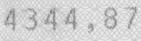 Binarization Alternative 1:
 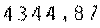 Binarization Alternative 2:
 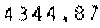 Binarization Alternative 3:
 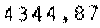 Binarization Alternative 4:
 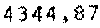 Binarization Alternative 5: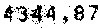
PREP_BINFILTER_*
With this parameter characters can be smoothed and ragged characters can be thickened or thinned out.
Small objects such as smudges can be deleted. Dot-matrix print can be prepared for recognition. Five selections are possible:
| Selection 1 | PREP_BINFILTER_VERY_THIN | Smoothing with strong thinning. |
|---|
| Selection 2 | PREP_BINFILTER_THIN | Smoothing with thinning. |
|---|
| Selection 3 | PREP_BINFILTER_MEDIUM | Smoothing without thinning. |
|---|
| Selection 4 | PREP_BINFILTER_THICK | Smoothing with thickening. |
|---|
| Selection 5 | PREP_BINFILTER_VERY_THICK | Smoothing with strong thickening. |
|---|
Example for Dot-Matrix Print:
Original Image: 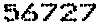 Filter Selection 1:
 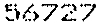 Filter Selection 2:
 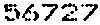 Filter Selection 3:
 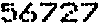 Filter Selection 4:
 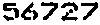 Filter Selection 5:
 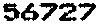 Example with Background Dirt:
Original image:
Example with Background Dirt:
Original image:  Filter Selection 1:
  Filter Selection 2:
  Filter Selection 3:
  Filter Selection 4:
  Filter Selection 5:
  Example with all Possibilities:
Original Image:
Example with all Possibilities:
Original Image:
Bin →
↓ Filter | 1 | 2 | 3 | 4 | 5 |
|---|
| X | | | | | |
|---|
| 1 |  |  |  |  | 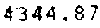 |
|---|
| 2 | 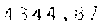 | 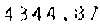 | 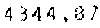 | 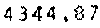 | 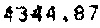 |
|---|
| 3 | 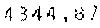 | 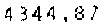 | 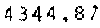 | 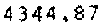 | 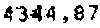 |
|---|
| 4 | 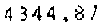 |  |  |  |  |
|---|
| 5 |  |  |  |  |  |
|---|
PREP_INPLACE- With this parameter setting the original image (in memory) will be overwritten with the resulting image
of preprocessing. This gives direct access to the result from setting
PREP_GRAYTOBIN_* and PREP_BINFILTER_*.
PREP_SCALING- transforms images to a resolution of 300 dpi.
deskew_min- Threshold value for deskewing. Zero means no deskewing (default).
filler1- 8 byte alignment.
noise_diameter_percent, noise_diameter_pixel- With the modules
REC, REL, and REP noise can be removed according
to its diameter. This setting can be relative to the mean width of the character strokes or directly given in pixels.
If REC is called from the REL module, only REL makes the noise reduction and not
REC. If REL is called from the REP module, only REP makes the noise reduction.
noise_width_percent, noise_length_percent,
noise_width_pixel, noise_length_pixel- With the modules
REC, REL, and REP dirt removal can not only be
controlled via the dirt diameter, but also over the width and length of the dirt.
Should pixels be used for specification of the noise reduction, the parameters noise_width_pixel and
noise_length_pixel must be set. For a relative specification, i.e. using a percentage of the stroke width,
the parameters noise_width_percent, and noise_length_percent must be set. Noise will be removed
if one of the settings for .._pixel or .._percent is found to be valid.
- 🚧
rem_back_gray_delta
- Remove background from a color image - maximum difference R-G-B as a "gray" pixel.
- 🚧
rem_back_gray_level
- Remove background from a color image - Which is the brightest pixel without background gray?
*gridparm- Field of
RelGridParm structures.
gridparm_maxlen- This parameter describes the size of memory, provided by the calling program under
gridparm
in the data structure ReParm. This memory is to receive the description of grid items (lines, boxes, combs)
that shall be searched and eliminated before or during recognition. The size of memory is described in units of data
structures RelGridParm.
typograph- This parameter allows to submit additional information to the
REL and REP
modules about the given images to simplify and speed up segmentation (if such information is available). The
predefined parameter values below can be combined using the logical OR operator "|" as long as the combinations make sense.
Of cause, not all combinations make sense.
For REL and REP:
TYPO_PROPORTIONAL Proportional spacing is assumed.
TYPO_EQUIDISTANT Equidistant spacing (fixed or monospacing) is assumed.
TYPO_NOLIGATURES With many fonts, but especially with handprint, some neighbouring characters may overlap, and touch each other. This is called a 'ligature'. Segmenting ligatures is a difficult problem and requires special algorithms. With fonts such as equidistant machine print there are normally no ligatures, so the related algorithms can be switched off. In this case this value must be set.
TYPO_NOTOUCHINGCHARS No attached characters are assumed.
TYPO_NOSEGALTERNATIV Segmentation into single characters is the most difficult task in character recognition. If characters are badly recognized, KADMOS tries alternative possibilities for segmentation. To switch this off (for example, if very good images are to be recognized) this value must be set.
TYPO_4_SEGALTERNATIV 4 segmentation alternatives are possible.
TYPO_8_SEGALTERNATIV 8 segmentation alternatives are possible.
TYPO_KEEPIMG For good segmentation it is insufficient to describe the segmented characters (lines or dots) by their surrounding rectangle only. If there is a need for direct access to the segmented images, then they must be stored separately, and this parameter value has to be set. The segmented images then can be accessed through result_image.
TYPO_EXTENDED_SEGMENTATION Segmentation errors especially with machine print are reduced by about 10%. Of cause this takes CPU time.
filler2- 8 Byte Alignment.
line_space, base_line- These parameters are optional. line_space is to be set only if recognition is required for fields with
more than one line. It specifies the distance between two lines and is used to distinguish between a comma on one line
and an apostrophe on the next. To distinguish between upper case "U" and lower case "u", image information alone is
insufficient. Additional information is needed regarding the position of the image in the current line and its height
relative to the line height. The parameter
base_line describes the scale, i.e. the height of a normal upper
case letter, as for example the characters 'A', 'B', or 'C'. The REP module uses this parameter - if specified -
to improve line segmentation.
char_space_min, char_space_max- These parameters describe the minimum and maximum distance between two subsequent characters of the given
font (if known), i.e. the distance from the beginning of one character to the beginning of the next, as measured in pixels.
By providing these values, character segmentation can be improved. If the values are not known, they must be set to zero.
code-
For every operating system a codepage is automatically initialized for communication with the engine. This codepage
can be changed (or retrieved after a call of
re?_init()).
CODE_PAGE_...
#define CODE_PAGE_437                   437
#define CODE_PAGE_720                   720
#define CODE_PAGE_737                   737
#define CODE_PAGE_850                   850
#define CODE_PAGE_852                   852
#define CODE_PAGE_855                   855
#define CODE_PAGE_857                   857
#define CODE_PAGE_858                   858
#define CODE_PAGE_864                   864
#define CODE_PAGE_866                   866
#define CODE_PAGE_874                   874

#define CODE_PAGE_1250                 1250
#define CODE_PAGE_1251                 1251
#define CODE_PAGE_1252                 1252
#define CODE_PAGE_1253                 1253
#define CODE_PAGE_1254                 1254
#define CODE_PAGE_1255                 1255
#define CODE_PAGE_1256                 1256
#define CODE_PAGE_1257                 1257
#define CODE_PAGE_1258                 1258

#define CODE_ISO_8859_1              885901
#define CODE_ISO_8859_2              885902
#define CODE_ISO_8859_4              885904
#define CODE_ISO_8859_5              885905
#define CODE_ISO_8859_6              885906
#define CODE_ISO_8859_7              885907
#define CODE_ISO_8859_8              885908
#define CODE_ISO_8859_9              885909
#define CODE_ISO_8859_10             885910
#define CODE_ISO_8859_11             885911
#define CODE_ISO_8859_13             885913
#define CODE_ISO_8859_15             885915

#define CODE_ASCII                  1000000
#define CODE_UTF_8                  2000008
#define CODE_UTF_16                 2000016
#define CODE_UTF_32                 2000032

/*** special classifier codes */
#define CODE_ASCII_7BIT             1000001
#define CODE_UTF_16_7BIT            2000017
optionsOPTIONS_BASICLABELS
This value must be set if the labels under labels and rec_char shall be basic labels instead of group labels.
OPTIONS_BASICLABELS_PARM
This value can be set for using basic labels instead of goup labels in the structure ReParm. It is independent
of the selection in OPTIONS_BASICLABELS_RESULT.
OPTIONS_BASICLABELS_RESULT
This value can be set for using basic labels or gouplabels in the structure RelResult or RepResult.
It is independent of the selection in OPTIONS_BASICLABELS_PARM.
OPTIONS_EXCLUDE
If no alternatives from recognition are wanted, and if a unique decision is required, then this value must be set under
options. In reality, some alternatives cannot be excluded - consider for example the O-0-problem or an isolated
character such as x. In such cases, alternatives are delivered in spite of the setting of OPTIONS_EXCLUDE
to exclude alternative results (see section "Labels and Alc Files"). To set
OPTIONS_EXCLUDE makes sense when high accuracy is required and a higher count of rejects can be tolerated.
For example, if the character 5 is written more like a 6, then without setting OPTIONS_EXCLUDE it will be
possible that recognition produces two alternatives, 5 and 6, both with good confidence (low values rec_value).
However, if OPTIONS_EXCLUDE is set, in this case a reject will be generated.
⚠️ Important: With OPTIONS_EXCLUDE set, a similar number of alternatives will be generated,
but with bad confidence.
OPTIONS_STRICTSELECT
t is meaningful to set this value if there are no alien (switched off) labels in the material under recognition.
Example: The label B is deactivated and (in spite of that) a character B is exposed for recognition. If
OPTIONS_StrICTSELECT is set, the recognition result can be an 8. Without OPTIONS_StrICTSELECT
the result will be a reject. This setting is possible for basic labels as well as for group labels.
OPTIONS_FAST_GRID
It activates a faster grid detection with almost same results. It can also set with re_layout() as well as
with re_page().
OPTIONS_FAST_REC
If set, this option forces faster recognition for handprint classifiers (hand*.rec from 100% to 60%, jumbo*.rec from 100%
to 50%). Quality is a bit lower, as some rec_values are unjustified lower than without this option. All alternative
results are provided, and noise will more often be recognized as a character.
OPTIONS_FAST
If set, it works like OPTIONS_FAST_GRID and OPTIONS_FAST_REC together.
OPTIONS_REL_REC_REPEAT
After a first recognition cycle in rel_do() or rep_do() the recognized single characters get
binarised and recognized anew directly from the color or gray image. The result is improved recognition accuracy.
OPTIONS_REL_CLEAR
It supports recognition of norm fonts like CMC7 or E13b. In those cases, line images often contain noise in the beginning
or in the end part. This noise will be recognized as everything else. But if it is recognized as noise, it will be
ommited in the resulting RelGraph and RelResult.
labels_size- Size of allocation of
labels or labels2. EPARM_LABELS_SIZE_MAX It denotes the maximum size of
labels or labels2.
labels, abels2labels is used to select characters from the active Rec file. If, for example, the Rec
file has recognition capability for the characters {0,1,2,3,4,5,6,7,8,9,+,-}, one can restrict recognition to the
characters '+' and '-' by setting labels to "+ - ". Each character class of the recognizer is described by a two
byte-string. An empty string "" is equivalent to selecting all character classes in the classifier as long as alc is zero.
The parameters alc and labels combine, if both are specified. By calling re?_info() one can extract
information about the character classes for the classifier. These functions deliver (under labels) the character
classes of the classifier. Please note that the character classes for each classifier can also be found in the related
Alc file. The Alc files are text files in the format of the Windows INI files (see section "Labels and Alc Files").
labels2 has the same meaning as labels but it describes the labels in Unicode with the data type short
instead of char.
KADMOS differentiates between group labels and basic labels. Let's take as an example the group of hand print numbers 9.
The group label is 9_. The group is made of the three basic labels 9_, 91, and
93. It is up to the programmer or user if the communication with KADMOS shall be using group labels or
basic labels. The default is group labels.
rejects, rejects2- It is used to select the rejects from the active Rec file is used for
OPTIONS_RESTRICT_LABELS
alc- A subset of the character set can be selected, as with
labels or labels2. This influences the active
recognition. ALC means "Alphabet Code". By using such restrictions, recognition accuracy can be improved and
recognition speed increased. The parameter alc is evaluated at every call of re?_do() or re?_info().
If alc is not zero, the corresponding labels are added to (re?_do()) or set to
(re?_info()) the parameter labels. alc is then set to 0 (=ALC_DEFAULT).
alc==0 means no restriction. To simplify the description of the required subset, ALC constants from Microsoft's
PEN Computing SDK can be used (ALC_ALPHA, ALC_NUMERIC, ...).
Character classes provided for selection for any given classifier can be retrieved from the Alc file related
to the given classifier (see section "Labels and Alc Files"). The ALC constants can be combined
using the logical OR '|'.
The following ALC constants are supported by KADMOS:
ALC_DEFAULT Full character set of the classifier, if labels or labels2 is empty.
ALC_LCALPHA Small letter
ALC_UCALPHA Capital letter
ALC_ALPHA Small letter and capital letter
ALC_NUMERIC Numbers
ALC_ALPHANUMERIC Small letter, capital letter and numbers
ALC_SPECIAL Punctuation marks and special characters
ALC_ACCENT Accented characters
ALC_ALL All characters
ALC_GESTURES Not used at the moment.
font- Dieser Parameter beinhaltet den gegebenen font.
font_HAND
font_MACHINE
font_HM (font_HAND|font_MACHINE)
font_LATIN
font_FRAKTUR
font_GREEK
font_CYRILLIC
font_ARABIC
font_FARSI
font_HEBREW
font_THAI
font_LANGUAGE(font_LATIN|font_FRAKTUR|font_GREEK|font_CYRILLIC
  |font_ARABIC|font_FARSI|font_HEBREW|font_THAI)
font_OCRA
font_OCRB
font_F7B
font_SEMI
font_CMC7
font_E13B
font_LCD
font_BRAILLE
font_NORM (font_OCRA|font_OCRB|font_CMC7|font_E13B|font_F7B
           |font_SEMI|font_LCD|font_BRAILLE)
font_LN (font_LANGUAGE|font_NORM)
font_ALL
reject_limit- The value of this parameter determines the level of confidence (
rec_value) for which
alternatives are provided internally and returned in the recognition results. This has significant impact on computing time.
The default value is 150.
filler3- 8 byte alignment.
pos- The
REL module uses information about the position of characters in the text line to help
differentiate characters such as U and u. The parameter pos is used to control how much the position of
the character shall determine the recognition result.
POS_NOLINECONTEXT
This value must be set for recognition without any positional information, if characters are to be recognized from their
geometrical shape (gestalt) only, with no regard to their position in their line.
POS_SOFTLINECONTEXT
As described above, REL uses the character position to help to discriminate characters from a textline. In this regard,
a value of deviation from the correct position of the character in the textline is determined for each recognition
alternative. This value is added to the recognition confidence level rec_value[i] for each alternative.
If POS_SOFTLINECONTEXT has been set, this deviation will be normalized so that the best result returns a
positional deviation value of zero.
POS_HARDLINECONTEXT
This value must be set if the character position is considered very important for recognition.
POS_NOWORDCONTEXT
If the given characters are to be recognized without considering the other adjacent characters (numbers, alphas, ...),
so this value has to be set.
hookparm- This parameter allows an application to pass parameters to private hook functiones. The modules
REL and REP always call the module REC - after segmenting the given image in
lines and single characters. For each character, the module rec_do() is called with a related, internal
structure RecData. If rec_hook is specified, it is called directly after every
rec_do() call, with the related structure RecData. This provides many possibilities for
tracking or controlling the isolated character recognition, for collecting samples and even to stop recognition.
The latter possibility is given by the return value of the hook function. If the hook function returns a value different
from RE_SUCCESS, rel_do() and rep_do() stop recognition and return immediately.
If a hook function needs its own specific parameters, the pointer hookparm in the structure ReParm can be used.
If for example hookparm is assigned an address (for example to private data) before calling
rel_do(), this address will be copied by rel_do() before every call to rec_do()
into the related structure RecData into the item hookparm. This address can then be
retrieved by the hook function.
Reference: